LoopIT external interfaces — overview
2026-06-05
Overview
The LoopIT exposes three interfaces a host can use to control it and read its data. Choosing the right one for each task is the most important early decision when you integrate the device into an experiment. This document is the starting point; each interface has its own detailed guide.
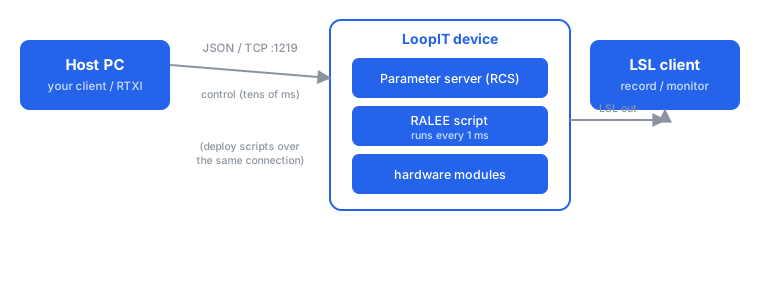
Parameter server (JSON over TCP). A program on your PC opens a TCP connection and exchanges JSON messages to read and write module parameters — for example to configure a stimulation waveform, turn stimulation on or off, or deploy a script. Because the messages cross the network and pass the safeguards that protect the real-time processes, expect lag and jitter on the order of tens of milliseconds. Best for setup, between-trial changes, and non-real-time control. See the parameter server guide.
Onboard scripting (RALGOL). For closed-loop experiments you write a small algorithm in the RALGOL language and deploy it to the device, where it runs in the main controller every millisecond. This takes the network out of the control loop and gives deterministic, sub-millisecond timing. See the scripting guide.
Output monitoring (LSL). Fields a script marks for streaming are published as Lab Streaming Layer outlets that any LSL client on the network can subscribe to. This path is read-only. See the monitoring guide.
The control paths share one transport: a RALGOL script is itself
deployed by writing it to a parameter (ral.0..protocol)
over the parameter server.
When to use which
| Aspect | Parameter server (JSON/TCP) | Onboard scripting (RALGOL) |
|---|---|---|
| Direction | Host PC → device (and back) | Runs on the device |
| Latency/jitter | Tens of milliseconds | Deterministic, within 1 ms |
| Typical use | Setup, on/off, amplitude, between-trial changes | Real-time closed loop |
| Language | JSON messages | RALGOL |
| Monitoring | LSL outlets (read-only) | LSL outlets (read-only) |
Platform note. The LoopIT is a platform: each device carries its own set of hardware modules and firmware. The exact module names, indices, valid parameters, and LSL streams therefore depend on the specific device. Treat the module and parameter names in these guides as illustrative, and discover the real capabilities of a device at runtime.
Parameter server at a glance
A host connects over TCP port 1219 and exchanges JSON. A message addresses a parameter by module, instance index (a quoted string), and field. By default every message must carry an authentication token shown on the device’s touchscreen. The recommended first step is to ask the device what it offers:
{ "?": { "!": "conf" } }The reply lists every module, instance and parameter, so you can
write your client against what the device actually supports rather than
hard-coding names. From there you read with a null value
and set with a real value. The parameter
server guide covers transport, authentication, discovery, replies
and error handling in full.
Onboard scripting at a glance
A RALGOL script has an interface block declaring its own fields and a script block that runs each cycle. The smallest counter, which streams its value over LSL, is:
1w interface {
  1w emit unsigned ticks;
} ral;

script {
  std::add(ral.ticks, 1) -> ral.ticks;
};
You deploy a script by writing its text to the .protocol
field of the ral module over the parameter server. The scripting guide builds up from this counter
to live-signal processing and rolling-window analysis, and shows how to
develop your own scripts by compiling them and reading the compiler’s
messages.
Output monitoring at a glance
Fields a script marks with the emit flag become channels
on an LSL outlet that any LSL client can discover by name or type and
record. The stream and channel set depends on the device and the running
script, so clients resolve streams at runtime rather than assuming a
layout. The monitoring guide explains
the stream metadata and shows how to read it.
Frequently asked questions
Which interface should I use for a closed-loop experiment? The onboard script (RALGOL), because it runs in the 1 ms real-time loop with deterministic timing. Use the parameter server to set its high-level parameters and LSL to monitor its output. See When to use which.
How do I control the device from a host PC? Over the parameter server: a JSON/TCP connection on port 1219. See the parameter server guide.
How do I record the device’s data? Subscribe to its LSL streams; this is read-only monitoring and does not interfere with control. See the monitoring guide.
Is the onboard language a dedicated language or C/C++? A dedicated language, RALGOL, compiled to bytecode that runs on the device’s virtual machine. See the scripting guide.
Do I need authentication? Yes, by default: each parameter-server message carries a one-time password shown on the device’s touchscreen. See the parameter server guide.
Reference client
A small reference client that connects to the parameter server, performs discovery, and submits settings is available from neuroConn on request. [TODO:Revise]
References
- Parameter server guide: json-interface.md.
- Scripting guide: ralgol-guide.md.
- Language reference: language-reference.md.
- Function library: function-library.md.
- Writing extensions: writing-extensions.md.
- Monitoring guide: lsl-monitoring.md.
- Lab Streaming Layer documentation: https://labstreaminglayer.readthedocs.io/.
- A complete command reference and reference client are available from neuroConn on request.